Remote Control for TV , All TV
- 4.4
- Rating
- 1.00M
- Installs
- Free
- Price
 Analysis by App-foxy
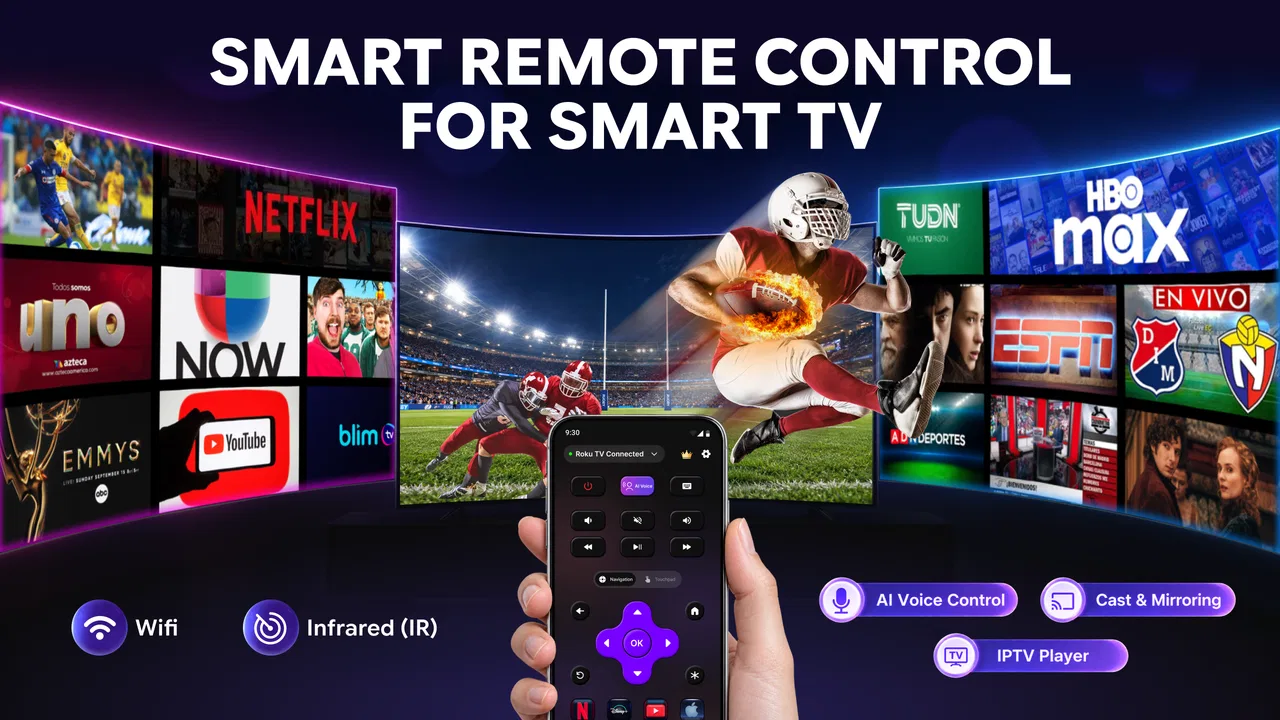
I tested Remote Control for TV, All TV as the kind of utility you reach for when the physical remote has disappeared under a cushion, stopped responding, or is simply being used by somebody else. It is a free tools app from Betasoft Mobile that aims to turn a compatible phone into a television remote through Wi-Fi or infrared. That basic idea is familiar, but its usefulness depends heavily on the television and the phone you pair with it.
In a shared home, that distinction matters. A phone-based remote can be convenient when one person is watching television and another is using the original controller, but it can also create small coordination problems if several people assume they can control the same screen. My overall impression is that this app is most valuable as a practical backup and occasional household remote, rather than as an automatic replacement for every physical controller.
How it fits into a shared household
The most convincing everyday scenario is simple: you sit down to watch something, discover that the television remote is missing, and use your phone instead. The app’s focus on both Wi-Fi and IR gives it a broader starting point than a remote that depends on only one connection method. If the phone has infrared hardware, that may help with compatible televisions even when the home network is not involved. If the phone relies on Wi-Fi, the television and phone generally need to be able to communicate through the same local setup.
You May Also Like

 Blood Strike: 2.5 Anniversary
Blood Strike’s Loadouts Turn Every Drop Into a Tactical Gamble
A close look at Blood Strike’s custom loadouts: how fast access to signature weapons reshapes its battle royale rhythm, rewards preparation, and narrows the gap between fights.

 Pandora - Music & Podcasts
Pandora’s Music Is Easy to Start, but Harder to Recover
Pandora’s strength is its low-effort path from a seed to a station. Its weak spot is how much confidence it asks you to place in connection, setup, and quiet recovery.

 8 Ball Pool
 Is Built on Rivalries, Rematches, and Routine
A close look at the rivalries, rematches, shared routines, and unanswered safety questions that turn a quick pool match into a persistent mobile community.

 Samsung Music
’s Quiet Strength Is Playing What You Already Own
Its reach comes less from spectacle than from dependable access to a personal library. That simplicity is both the app’s strongest retention engine and its ceiling.

 AccuWeather: Weather Radar
AccuWeather Review: A Quick, Clear Forecast for Everyday Decisions
For everyday plans, the best forecast is the one you can understand quickly. AccuWeather makes rain timing, radar, and local conditions easy to act on, with a few trade-offs.

 Hill Climb Racing
Why Hill Climb Racing Still Turns Crashes Into One More Run
A tiny car, a bumpy hill and one more upgrade: Hill Climb Racing keeps resurfacing because its simple chaos makes every near-miss feel personal.
More From Our News Desk



That makes the app useful in more than one room, but not in every situation. A phone with IR can be handy for older or less network-oriented televisions. A Wi-Fi connection is more natural for newer smart TVs, yet network isolation, guest networks, or a television that is still waiting for initial setup can interfere with discovery. I would not treat the phrase “any TVs” as a guarantee that every model will respond equally well. Compatibility is the first thing I would test before depending on it for a family movie night.
In a home with several people, the app also changes who holds control. The person with the phone has the immediate ability to change channels, adjust volume, or switch inputs. That is convenient when the original remote is unavailable, but it is worth agreeing on who is operating the television. A shared screen works better when one person takes responsibility for the controls instead of several phones sending commands at the same time.
The best household use is as a clearly understood backup remote, not an invisible way to take over the television. That sounds obvious, but it affects the experience. If children, guests, or roommates all install it without discussing which phone should be used, the convenience can quickly become confusion. The app provides the control surface; the household still needs a simple agreement about when and how it is used.
What setup is really asking from you
The first boundary is the connection method. Wi-Fi control normally makes the most sense when the television is already connected to the home network and the phone is on that same network. If the TV is offline, the router is separating wireless devices, or the phone is using mobile data instead, the app may not be able to reach the set. This is not a problem unique to this product, but it is the main reason a remote app can appear not to work even when the television itself is fine.
IR has a different set of expectations. It is closer to using a traditional remote: the phone needs the appropriate hardware, and the signal generally needs a clear path to the television. A phone without an infrared transmitter cannot gain that ability through an app alone. Before troubleshooting endlessly, I would check whether the handset supports IR and whether the television reacts when the phone is aimed toward it.
A useful setup habit is to begin with low-risk commands. Try power, volume, and navigation before changing inputs or launching a complicated viewing session. If the television responds inconsistently, you can identify the problem without interrupting someone’s program. I also recommend keeping the original remote nearby during the first pairing attempt. That is not because the app is necessarily unreliable; it is because a physical controller gives you a quick fallback if the TV needs a network confirmation or an input change.
The app is free to install, which makes this testing approach easy. It includes optional in-app purchases priced from $3.99 to $39.99 per item, so I would first confirm that the basic connection works on the intended phone and television before paying for anything. A remote that cannot communicate with your particular setup is not rescued by additional spending. The sensible order is compatibility first, convenience second, and optional purchase only after the app has earned a place in your routine.
There is also an account-boundary question. If one person pays for an optional item or configures the app on a personal phone, that does not automatically turn the phone into a household-owned device. In a shared home, I would decide whether the app belongs to one designated controller or whether several adults should configure their own phones. Keeping that boundary clear avoids arguments about who can use the remote and prevents a guest from assuming that every saved setup belongs to them.
Coordinating control without making the room chaotic
Remote apps are often judged by button response, but shared use is just as important. If two people are watching together, the smoothest arrangement is to choose one operator for the session. That person can keep the phone unlocked and nearby while everyone else makes verbal requests. It sounds less spontaneous than passing the phone around, yet it prevents accidental channel changes and makes the app feel more like a normal shared remote.
For roommates or family members, a second practical rule is to identify the television before sending commands. In a home with more than one compatible set, a phone may be paired with the wrong screen if the user taps through setup too quickly. I would label the room in ordinary conversation—living room, bedroom, or guest room—and confirm the target by changing volume briefly. This is a small step, but it avoids the awkward moment when a private room suddenly reacts to a command intended for the lounge.
Another useful workflow is to keep the phone’s role narrow. Use it for the television controls, then return the phone to its owner instead of leaving it on a coffee table for anyone to pick up. This reduces accidental touches and respects the fact that the handset may contain personal messages, photos, or accounts unrelated to the television. The remote function should not become an excuse for unrestricted access to somebody else’s phone.
I also found that a phone-based remote is better for short interventions than for every interaction. Muting an advertisement, adjusting volume, or switching back to a familiar input is convenient. Entering long searches or navigating a large smart-TV interface may still be easier with the television’s original remote, depending on the model. A physical controller usually has dedicated buttons and does not require you to unlock another device first. The app’s advantage is availability; the traditional remote’s advantage is immediate, single-purpose access.
That trade-off becomes clearer when the household has guests. A visitor can understand a normal remote without needing to install anything or connect to the network. Asking a guest to download an app, grant access, and learn the pairing process is excessive for a one-evening visit. I would keep the app for household members who expect to use it repeatedly, while leaving the physical remote available for visitors and situations where privacy or speed matters more than convenience.
Age, trust, and responsible use
The app is rated for Everyone, which fits its straightforward purpose as a television-control tool. Still, an age rating does not remove the need for household guidance. A child who discovers that a phone can control the television may treat the buttons like a toy, especially if the device is left unattended. That can interrupt viewing, change inputs, or create confusion about whether the television is malfunctioning.
I would introduce it to younger users as a shared responsibility rather than a private power. They can ask before changing the channel or volume, and an adult can keep the designated phone in a known place. This is not a claim that the app includes special family-management functions; it is simply a sensible way to use a general remote tool around children. The app controls the TV, but the household decides who is trusted to operate it.
Privacy deserves the same calm, practical treatment. A remote app may be used on a phone that belongs to one individual, so handing it to somebody else exposes more than the television controls. If a child or guest needs to make a change, it is safer for the owner to operate the phone or unlock only what is necessary. I prefer this arrangement to leaving a personal handset permanently available on the sofa.
For older relatives, the app can be helpful if the phone is easier to locate than a small remote, but the experience depends on comfort with the device. A physical remote offers tactile feedback and familiar buttons, while a phone adds a screen, app launching, and possible connection steps. I would set it up in advance, demonstrate only the controls that matter, and avoid presenting it as a universal replacement until the person has successfully used it several times.
Trust also matters between adults. A remote app can be used playfully, but changing the television while someone else is watching is still disruptive. In a shared apartment, I would not install it on another person’s phone or pair it with a television without permission. The technical ability to send a command is not the same as permission to do so. That boundary is especially important when the app is installed on a personal device rather than a tablet kept in the living room.
Performance expectations and useful troubleshooting
The current version is 2.5.2, and the app supports phones running Android 7.0 or later. That gives it a reasonable reach across older Android devices, although operating-system support alone does not guarantee that a particular handset has IR hardware or that a television will be compatible. I would check the phone’s capabilities and the TV’s connection state before assuming that an installation problem is responsible.
If Wi-Fi pairing fails, start with the basics: confirm that both devices are connected to the intended home network, turn off any temporary mobile-data workaround, and check whether the television is awake and ready to receive commands. Guest networks are a common source of separation between devices, so moving both devices to the main household network can be a useful test. Restarting the app and television is also worth trying before repeating the entire setup.
If IR is the chosen route, aim the phone directly at the television and test from a normal viewing position. Do not judge it from behind furniture or at an extreme angle. If there is no response at all, the phone may simply lack an IR transmitter, in which case Wi-Fi is the more realistic path. These checks are more productive than repeatedly tapping the same virtual button.
One non-obvious trade-off is battery and attention. A physical remote is always ready and consumes no phone screen time. A phone remote may require unlocking the handset, opening the app, and keeping the device available. That is a minor inconvenience for a quick volume adjustment, but it becomes noticeable during long viewing sessions. I would use the app when the original remote is missing or inconvenient, not because it automatically improves every interaction.
Another trade-off is resilience during network trouble. Wi-Fi control is attractive for smart televisions, but a router problem can remove the remote at exactly the same time that streaming services are having trouble. IR, where available, can be a useful independent fallback because it does not depend on the home network in the same way. This is one reason I would not discard the physical remote after installing the app. Different control methods cover different failure points.
Who should use it, and who should skip it
I would recommend Remote Control for TV, All TV to someone who frequently misplaces the original remote, wants a backup on an Android phone, or manages a television in a room where the physical controller is often unavailable. It is also a reasonable option for a household that wants one designated phone to handle quick changes without buying another replacement remote immediately.
It is less suitable for someone who expects guaranteed compatibility with every television, has no interest in checking network conditions, or needs a remote that any guest can use instantly. People who strongly prefer physical buttons may also find the phone-based approach less comfortable. If the television is older and the phone lacks IR, Wi-Fi support becomes essential; if the TV is not network-ready, the app may not solve the original problem.
The app’s rating of 4.4 from around 34 thousand ratings and more than a million installs suggest that many people find this type of utility worthwhile, but those figures should not replace a device-specific test. A large user base cannot make an incompatible phone transmit infrared, and popularity cannot remove network restrictions in a particular home. I see those figures as a reason to consider the app, not as a promise about your exact television.
It is also worth remembering that the app is an ordinary tool, not a substitute for every function built into a television’s own ecosystem. A manufacturer’s remote app may offer deeper integration with that brand’s smart features, while a physical replacement remote may be faster for guests and older users. This app makes the most sense when flexibility and availability matter more than brand-specific extras or tactile control.
My household verdict
After looking at it as a shared-home utility rather than just a collection of virtual buttons, I see a clear role for it. It can rescue an evening when the remote is lost, give one household member a convenient backup, and work through either Wi-Fi or IR when the phone and television support the relevant method. The free entry point makes it easy to test without committing to a purchase, while the optional items mean I would verify the essential connection before considering an upgrade.
My advice is to set it up deliberately: choose the right phone, confirm the television, decide who will operate it, and keep the original remote nearby until the arrangement proves dependable. In a family or shared apartment, that small amount of coordination matters as much as technical compatibility. It keeps the app from becoming a source of accidental interruptions or unwanted access to someone’s personal device.
For me, this is a useful backup with genuine everyday value, but not a universal replacement for a physical remote. If your phone and television cooperate, it can be the quickest answer to a missing controller. If they do not, a standard replacement remote or the television maker’s own solution may be the better choice. The app earns a place in the household when its convenience matches the way people actually share the screen.
Betasoft Mobile has kept the concept focused: install a tools app, connect it through the available method, and use the phone when the television needs a command. That simplicity is its strength, provided expectations remain realistic. I would recommend trying it for your main viewing room, explaining the household rules to anyone who will use it, and judging it by reliable daily control rather than by the promise of working with every set.
FAQs for Remote Control for TV , All TV
01What devices are compatible with the Remote Control for TV app?
The Remote Control for TV app is compatible with a wide range of smart TV brands, including Samsung, LG, Sony, and Roku. It works on both Android and iOS devices, ensuring users can easily connect their smartphones or tablets to their TVs without needing additional hardware.
02How do I connect my smartphone to my TV using this app?
To connect your smartphone to your TV, ensure both devices are on the same Wi-Fi network. Open the app and select your TV brand from the list. Follow the on-screen instructions to pair the devices. The app may require you to enter a code displayed on your TV screen for a secure connection.
03Are there any in-app purchases or subscription fees?
While the Remote Control for TV app is free to download, it may offer in-app purchases for additional features or an ad-free experience. Users can choose to enhance their app functionality with these purchases, but the basic features typically remain free for all users.
04What features does the app offer beyond basic remote control functions?
Beyond basic remote functions like volume and channel control, the app often includes features such as voice search, a keyboard for easier text input, and customizable button layouts. Some versions also offer the ability to stream content from your device directly to the TV, enhancing the viewing experience.
05What should I do if the app is not working with my TV?
If the app isn't working, first ensure that your TV and device are connected to the same Wi-Fi network. Check for any updates for the app or your device's operating system. Restarting both the TV and the device can resolve connectivity issues. If problems persist, consult the app's support section for troubleshooting tips.
Pros
- Easy setup with most TV brands.
- User-friendly interface and navigation.
- Supports voice commands for convenience.
- Customizable remote layout options.
- No additional hardware required.
Cons
- Contains frequent in-app ads.
- Limited features in the free version.
- Occasional connectivity issues.
- Not compatible with older TV models.
- Requires stable Wi-Fi connection.

Remote Control for TV , All TV
Gallery